Pages

Thursday, April 23, 2009

15 free and open source tools for web designers / developers

Who is web designer? Someone who specializes in graphic design?.What tools they all are found of ?

I’m talking about the windows and mac users who generally use the Adobe products or illegally use the cracked software’s and never look in the free and open source world.If we talked ethically then we should discuss about the open source evangelisms.Might be you are interested to know about the scope of web designing and development in the arena of free and open source.Their are very vast amount of free and open source tools for designers.Here are the 15 best open source and professional tools of the web savvy designer:

  1. Agave - Agave is one of the best solution for designers to feel the color scheme, contradicts colors, soft colors & all with a fabulous outlook.
    agave-designer
  2. NVU - The open source replacement for Dreamweaver.You can Design, develop, and maintain professional websites and applications and yes its absolutely free.
    nvu-designer
    How to beginning A Project in NVU
  3. Quanta - Quanta Plus is a highly stable and feature rich web development environment.You can access the FAQ for further details.
    quanta-designer
  4. Inkscape: The vector graphics application which may spell the end for Adobe Illustrator.
    inkscape-designer
  5. Blender -Blender is the free open source 3D content creation suite, available for all major operating systems.Do you know that Elephants Dream is the world’s first open movie, made solely with open source graphics software such as Blender.
    blender-designer
  6. GIMP:Gimp the open source replacement for Photoshop. (Mac, Linux, and Windows)
    gimp
    Cnet.com also had some good reviews on the Gimp , one of them is as follows

    Pros: Defiently good for beginners and you create some very awesome looking images. Also very easy to use and enough effects tools to keep anyone happy. It’s like a baby version of Photoshop :D. A billion formats to choose from to save your image.

    Cons: No line/path making feature! Hard to get toolbars to stay in places. If you put the layers toolbar somewhere for instance, when you reopen it’s not there.

    Summary: Absorlutly brilliant. Fun, easy to use, simple (not as simple as ‘Paint’ :P) , a brilliant peice of freeware!! Also comes in a portable version for your flashdrive. by tom_hack_i

  7. Skencil - Skencil is a vector drawing application for illustrations and diagrams.It an open source artwork application that helps in making something clear or attractive.
    skencile-designer
  8. Karbon14 – It is another scalable vector-based drawing application that’s part of the open source KOffice project.
    Karbon14-designer
  9. Krita - Krita is another awesome painting and image-editing open source software application for KOffice
    Krita-designer
  10. Mozilla Composer : Composer is a free WYSIWYG editor provided by the Mozilla Organization.Please note that you need not to have any HTML coding knowledge for creating a website with Composer.
    Composer-designer
    Note:

    The Mozilla Suite is no longer supported by the Mozilla project

  11. GraphicsMagick - GraphicsMagick may be used to resize, rotate, sharpen, color reduce, or add special effects to an image and save the result in the same or differing image format. Image processing operations are available from the command line, as well as through C, C++, Perl, Tcl, Ruby, or Windows COM programming interfaces graphic-magic-designer
  12. Bluefish: An HTML editor for programmers written using GTK, designed to save the experienced webmaster some keystrokes. (C) (GNU/Linux, Unix)
    bluefish-designer
  13. Amaya :Its an open source based W3C’s complete web browsing and authoring environment.Its basically a Web editor, i.e. a tool used to create and update documents directly on the Web
    amaya-designer
  14. Cssed: A CSS editor featuring auto completion, syntax highlighting and validation. (C, C++) (Linux)
    cssed-designer
  15. Pico - from wikipedia

    Pico is a text editor for Unix and Unix-based computer systems. It is integrated with the Pine e-mail client, which was designed by the Office of Computing and Communications at the University of Washington

Note:Few alternatives to use the windows tools on the linux:

  1. You can use VMWare with a virtual machine for Linux.
  2. Wine is an open source software for running Windows applications on other operating systems.
  3. Cygwin is a Linux-like environment for Windows.Its basically different collection of tools which provide Linux look and feel in windows box.

Partition Master - Easily manage the hard disk partition without any fears

About 90% of the new laptops and notebooks comes with pre-install OS that generally have only single partition.We often loose our precious data when ever the single windows partition is messed up.We normally thinks that managing partitions is very geeky and risk prone work.Due to the fear of loosening data we never touch the partition tables.Now the question is how to manage the partition tables without any fears?

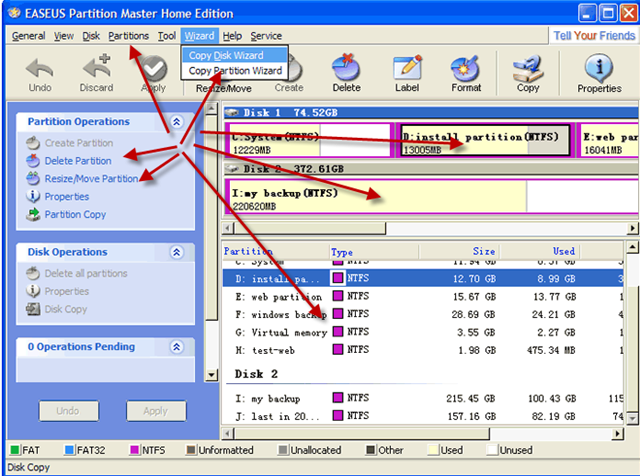
Partition-Master EASEUS Partition Master is freeware that may change your mind.Its a very simple disk partition management tool with which we can easily manage,create, format and delete partitions in the hard drive.Now, we don’t need to stick with Windows Vista and can also manage the partition(like ext2,ext3 ) for the Linux installs.

What is the benefits of using EASEUS Partition Master?

EASEUS Partition Master manage very large no of file types and it also support up to 800GB of hard drives.The best feature is that you can move and resize partitions without any fear of loosing data from your hard drives.It can copy your hard drives bits by bits like a piece of cake.Partition copying, physical geometry indicator,a boot disk creator,drive letter swapping, and password protection of drives are few of its candy features.partition-master

EASEUS itself claim that

With EASEUS Partition Master you won’t be afraid of creating, deleting, formatting, moving and resizing partitions in your hard drive anymore

On Cnet.com i found the following reviews

Bit-for-bit disk copy w/ easy repartitioning on the fly as you’re building the new disk. Easy to install, easy to use, good online help for the one question I had.

I had to get rid of one of those software restore partitions and resize the partitions. It really worked perfectly and I didn’t lose any of my software.

Download Now

Conclusion:If you need a risk free ,simple partition software as an alternative of software’s like partition magic then go for partition magic.Moreover if you any problems in installing or performing partitions in hard drives then feel free to comments her

Speeding up your system with free Advanced SystemCare

If you are fed up of slowdown and freezing of your system then you have to look over the tools that can boost your system performance.The most common problem in windows is poor system crash and severe security threats of malware and viruses.In case you are looking for common cure then Advanced SystemCare is a Free tool for curing most of the problems related with your computer.It a common tool for enhancing the performance in just few simple clicks.The program helps in protecting, repairing, and modify your computer to achieve maximum efficiency. Advanced-SystemCare

Some of the important features are:

  • Removing Spyware and Adware.
  • Temporary Files Cleanup.
  • One click mechanism for Speeding up System.
  • Preventing Security Threats.
  • Privacy Protection.
  • Fixing Registry Errors.
  • Startup Cleanup.
  • Repairing Windows.

advance-system-care

Reviews on Cnet:

Advanced SystemCare Free (formerly Advanced WindowsCare Personal) has a one-click approach to helping protect, repair, clean, and optimize your PC. With over 20,000,000 downloads since 2006, this fantastic, award-winning.

Advanced SystemCare Free provides a convenient way for non-technical users to perform routine maintenance and apply system optimization tweaks without the need to become a computer geek

Download Now

Songbird – iTunes flavored open music player

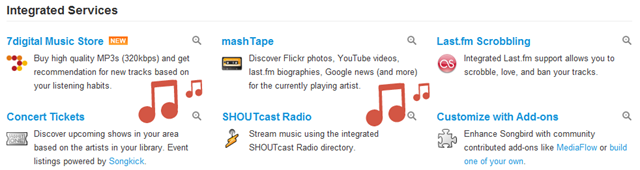
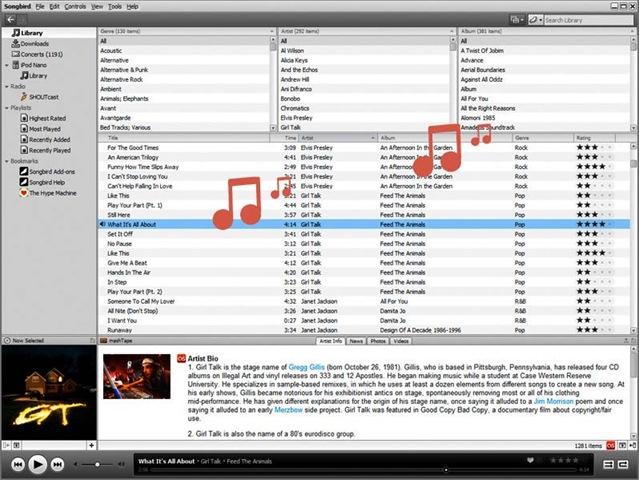
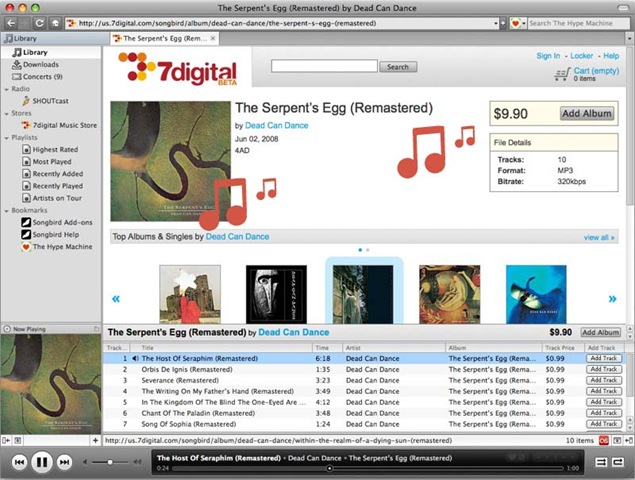
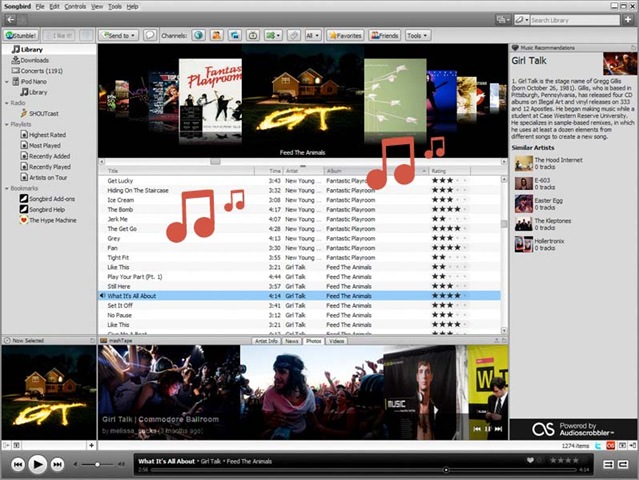
At a first glance you will thought of an iTunes but its quite better when you observed the tag of “open source” on it.Songbird is an open-source customizable music player that’s comes with lots of innovative features and services.If you ask me any questions then i would like to counter back with a one liner question that “Have you saw any media players comes with the open options of add-ons?”

songbird

Have a look over all Add-ons of the Songbird.You will feels like the freedom of firefox and linux while using this player.As it is a cross platform application so it runs on Windows, Linux and Mac.Their is the huge lists of features like you can easily add media to Songbird by importing from your file system or iTunes,Create dynamic playlists that automatically update based on criteria you set,Browse, organize, sort and search your media,Songbird includes an integrated web browser with features like bookmarking, tabbed browsing.Their are other options of media playback,gapless playback,custom ui and many developing features to support large amount of devoices like Apple iPhones, iPod Touch and Microsoft Zune devices.CD ripping and video player mode are some future launch features that this payer includes.

songbird

Songbird says that

We’re working on creating a non-proprietary, cross platform, extensible tool that will help enable new ways to playback, manage, and discover music. There are lots of ways to contribute your time to the project. We’d love your help!

Screenshots

songbird-mashtape

songbird-music-store

songbird-addons

Download Now

How to upgrade / unlock your iPhone in 15 minutes

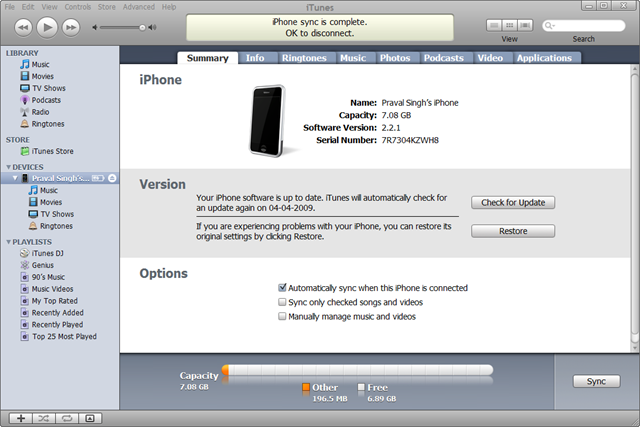
In this tutorial we discuss about the easiest method to jailbreak your iPhone into latest 2.2.1 firmware release by the apple.QuickPwn 2.2.5 is the tools that helps in upgrading, jail breaking, and unlocking your Apple iPhone to run a free flow new firmware.Note:All the downloadable files are available at the end of the post.upgraded-unlocked-iphone

Follow the procedure:

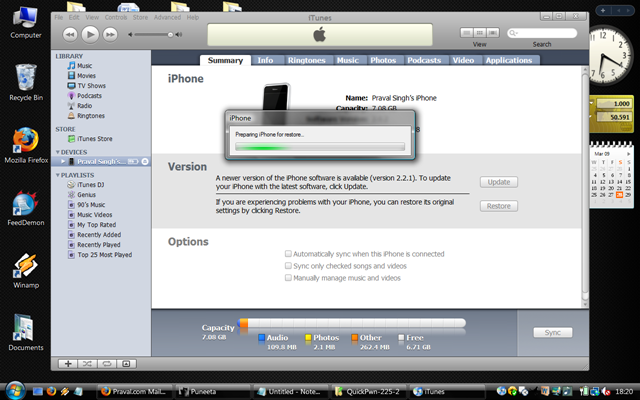
  1. Start your iTunes and connect your iPhone into it.The it will ask to upgrade your iPhone for firmware to 2.2.1.28-03-2009 18-20-22
  2. Freely upgrade your iPhone from iTunes.(Even if you are using previous jailbreak firmware upgrade it as it will be unlocked later by QuickPwn).QuickPwn changes the firmware settings and doesn’t actually upgrade your iPhone so this process is quit necessary.28-03-2009 18-22-01
  3. After the successful upgrade,You iPhone will be unlocked and here starts the game.28-03-2009 18-27-20
  4. Get the latest version of QuickPwn 2.2.5 QuickPwn for Windows (39) or QuickPwn for Mac (22).
  5. Simply extract the file into a folder and launch the QuickPwn 2.2.5 program.It will ask for connecting your iPhone into your computer via the USB cable. Note:As soon as the blue arrow button glows, click it.28-03-2009 18-29-22
  6. QuickPwn application will auto detect the firmware file(.ipsw extension) downloaded via iTunes.If it doesn’t detect the file then you may download these files from from apple servers.Note: For 2.2 restore firmware ipsw file for 2G iPhone1,1_2.2.1_5H11_Restore.ipsw / 3G iPhone1,2_2.2.1_5H11_Restore.ipsw
    28-03-2009 18-29-43 28-03-2009 18-30-04 28-03-2009 18-30-40
  7. Check the ‘Add Cydia’ and “Add Installer” – If you simply wants to upgrade into latest firmware. Add Unlock also if you also wish to unlock your 2G iPhone.28-03-2009 18-31-01
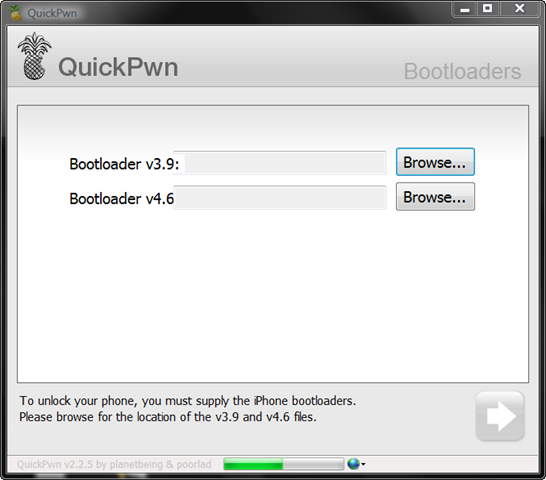
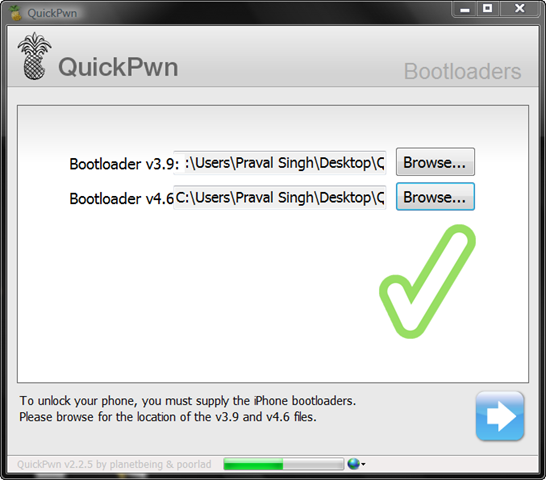
  8. Just bypass this step if you don’t need any unlocking else NOTE: You need to download following two binaries in case you want to unlock your iPhone.The binaries are as follows:

    28-03-2009 18-31-1528-03-2009 18-32-09

    28-03-2009 18-32-24

  9. Before performing the final action,check again if your iPhone is connected via USB cable.28-03-2009 18-32-43
  10. Caution: Follow the following procedure with precession as any delay results in fail:
    1. Hold the Home key for 3-5 seconds28-03-2009 18-33-02
    2. Hold both Home key + Power key for 10 seconds
    3. Now, release Power key but continue to hold Home key for 30 seconds28-03-2009 18-33-35
    4. Note:Don’t forget to hold the Home key for the above 3 steps of jailbreaking.
  11. All done have fun: Check your iPhone screen for the reboot and new motions.28-03-2009 18-34-37
  12. Now your iPhone will be flashed and reloaded with new firmware.flashing-nor-iphone
  13. In order to confirm the iPhone version you can also check by opening the iTunes28-03-2009 18-45-12

Files used:

Note:Praval did this hack for a friend of his who owns an iPhone 2G!

Disclaimer: This post is for education purpose,we don’t offer any liabilities and responsibilities for any misuse of this method.

Images Inserting Features In Gmail Labs

Another one expected updates finally comes out in Google’s Gmail service. In before to built-in images you have to upload somewhere else and then paste into your compose box by using this “insert images and other html into gmail” tricks. No more critical steps and even who has no experiences about programming — he won’t understand how html works within a minutes.

Software Engineer of Gmail, Kent says, “Make sure you’re in rich formatting mode, or it won’t show up. Click the little image icon, and you can insert images in two ways: by uploading image files from your computer or providing image URLs. Keep in mind that Gmail doesn’t show URL-based images in messages by default to protect you from spammers, so if you’re sending mail to other Gmail users, they’ll still have to click “Display images below” or “Always display images from …” to see images you embed.”

I appreciate such types of updates but why it’s too late we really don’t know but truly worthy and more friendly ways to make mail with photos. Take some shots and tell others by inputting quotations in below of the photos and gmail is with you.

Piratebay’s All Links Blocked By Facebook

In last month, ThePirateBay — the largest torrent based websites which enabled a great functionality which will help to connect with millions of facebook users but two weeks later, Facebook.com - the world’s largest social networking site just blocked all piratebay’s torrents links from facebook. When you’re trying to share any links of piratebay’s you will get a warning which says, “warning: this message contains blocked content” - frustrating sounds for piratebay.

According to Facebook spokesman Barry Schnitt, “Given the controversy surrounding The Pirate Bay and the pending lawsuit against them, we’ve reached out to The Pirate Bay and asked them to remove the ‘Share on Facebook’ links from their site. The Pirate Bay has not responded and so we have blocked their torrents from being shared on Facebook.”

After having blocked still thepiratebay.se accepted and lots of discussions going on torrentfreak. The Pirate Bay’s Peter Sunde told TorrentFreak that this is plain censorship and said he will try to come up with a workaround so people can continue to share. “I’ll fix it later today so it will have a link to a redirect site or something,” he said. But, how is it possible for them? It’s still not clear and should be visible in future.

Twitter Real-time Search Engine Is Broken

Twitter which giving real time search engine experiences — when you’re searching any keywords it being taking the information from most recent twittered contents. It can be less then 20 seconds to 30 seconds. As well Twitter search engine has advanced features which will more options, specifications, better results, user based, place selections, words or keywords, attitudes, time and date and so on. On basis of your all inputs you can get desired information from twitter and it’s not automated — it’s from someone from somewhere else which has posted on twitter. And twitter which is fully user based and results also grabbing information from the users.

Lots of sounds comes out. “Many think Twitter’s real-time search of its 140-character ‘tweets’ posted by users on the service will become the next great battlefield in search,” — says Kara Swisher of AllThingsD. All we know which company actually controlling the search engine market. And Caroline says, “Google currently dominates the general search market, with third-place Microsoft struggling to get more share.” — In this situations what’s going on?

I have tired to search iPhone which is messed up totally. The main problem is, it’s showing the results on time basis or time based. Why they also not concentrating in data or contents whatever it may late but relevant. Google is famous just to showing up relevant results on basis of keywords and why twitter not — though twitter is growing and growing company.

“What we need is for Twitter Search to also take relevance into account when displaying results. What is relevance? Timeliness is a part of it–a big part. But let the sort order be influenced by some other data and you might get something incredible” — says by Caroline. I totally agree with it and I said it above.

Bebo Has Received 50 Percent Growth Within a Month

In last February Bebo.com - another one growing, life streaming social networks redesigned and also it was acquired for $850 million in last years by AOL web portal company. Recently, it’s achieved a significant growth which is remarkable. Around 50 percent growth in march and received 4.6 million unique visitors in US - on basis of complete.

Should entitled that, “AIM has a connection with Bebo presently and when you’re going to edit your own profiles — it will redirected to your bebo profiles. You will get desktop client, moreover will get IM features within bebo networks which is really slick and greater way, faster ways to always communicate. You know, not possible to always open a pages in browser to get in touch with your bebo networks friends. Even, it’s not fully integrated with ebuddy, meebo or digsby multiple messengers but AIM already integrated. So, easy to manage your social communications without old AIM friends and your new bebo network’s friends.

07 Exclusive Mozilla Firefox Gmail Add-ons

Mozilla Firefox which has integration of extensions or add-ons features — which will give you more power, makes you productive, handle your works shortly, do your frequent works without login any specific websites frequently. I’m going to share some Google’s Gmail extensions which is really great and save your times a lot.

Before to move forward, don’t install all files at a time — try those extensions which may help you or it may help you to handle your works perfectly.

GTDInbox– Do you wants some organizational tools? GTDInbox will make your gmail account Organizational tools friendly which is really awesome. You can do lots of tasks inside, use as personal information database and so on.

Gmail Manager — Do you need to main multiple email accounts? You like to use two email accounts for privacy? One for family and one for professionally? This gmail manager can help you and for every new email you will get a visual alerts plus audio notifications at the same times.

Gmail Notifier– It’s working greatly when you have multiple gmail accounts and a small icon will lived in status bar’s right hand corner.

Gmail RTL– It will secure your totally gmail system from any types of unexpected problems. It will allow to send and receive encrypted messages throw gmail system.

Gmail RTL — Always righting from left to right side. Alternatively, you can change this mode. Write from right to left in Gmail, it’s available only in the Hebrew and Arabic gmail version’s service.

Xoopit — Gmail has built in search engine which will help you search any information based on your data. But this add-ons will make your photos, videos more collaborative. Easier to get any attachment files — because it will show in one place plus with attachments you will see the icons in right hand.

WiseStamp
— WiseStamp brings more functionality in signatures. You can attach your ready mate social icons integrations with your every email and also IM info and so on. Differentiation of business signatures and personal signatures features already in gmail’s lab.

Why Content Strategy Matters

When you invest on a social media, there are two important things that you must consider: content and connection. Without these two aspects, your branding strategy will not make a dent amidst the overflow of information in modern mass media.content-strategy

That is why it is very important for your company to define its content strategy. Such definition becomes more important if you want to become competitive on the web. That is because virtual social media is overflowing with content.We at mediaredefined think that if you cannot position your content ahead of others and make a difference, then your content creation can be overwhelmed by the overflow of information on the Internet.

As a first step, you need to define the purpose of your content. Is your content designed to build authority or is it created to pre-sell something. Your content can also be a tool for viral marketing or simply an information resource so you can generate lots of followers. Defining the purpose of your content is the building block of your company’s content strategy.

Second, you need to decide which form of social media to use to deliver your content to the target audience. This step involves analysis on the most effective social media on the web. For example, you can venture into video streaming which is the most popular type of social media today.

Lastly, you have to develop ways how to manage your content. Citizen of the web are always looking for fresh and updated information. You need to answer this demand so that your content will be relevant to many people.

Moreover,have a look over the presentation of “alchemy content” on Content Strategies.

Enjoy Twitter Without Refreshing Pages In TwitZap

Twitzap an web based twitter clients which is neat and clean, faster and better then twitter — specially when twitter is slower. Twitzap has search channels which brings the main differentiation in between of other twitter apps. Click on your username from the menu on right hand side and and start quicker search there. Twitzap which is automated and giving real time results. You can search this terms, “social media, web 2.0 and add them in the menu area.

TwitZap’s site is updated automatically and in real time, at the speed you choose with the little bar in the upper left corner. Turn the knob all the way left, and the updates will be paused. This is a nice improvement from Twitter’s standard page which has to be updated manually. Although still in beta (what isn’t these days), TwitZap offers a nice blend of features which just might make it worth your while. On the other hand, advanced clients like Tweetdeck (TweetDeck reviews) offer a lot more functionality, so users who are already used to them might prefer to wait till their favorite client adds these features. But, if you’re using the standard Twitter interface and want some improvements without switching to a desktop client, TwitZap is a solid choice — Mashabel says. It’s really awesome web applications and brings more faster twitting expernces.

25 Twitter Applications List

apps

Hundreds of applications already have built based on twitter.com. Twitter which is well known for micro blogging, professional networking, business to business networking and different purpose it’s being used and still using. Even, nowadays maximum well known companies directly interacting with their customers, taking feedback, sharing, exchanging information through twitter and upgrading themselves in competitive markets. I’m trying to share some cool twitter based web applications / tools — it may makes your productive.

Twitority — Authority based twitter searching features plus ajax based search results brings. Easy to grab what things people talking around you.

Tweetizen — Tweetizen is a simple web-based tool designed to help you filter the daily influx of tweets, and easily find the ones that are relevant to you.

Tweetree — Tweetree puts your Twitter stream in a tree so you can see the posts people are replying to in context. It also pulls in lots of external content like twitpic photos, youtube videos and more, so that you can see them right in your stream without having to click through every link your friends post.

Destroytoday — Adobe AIR based twitter applications, lets control your account from desktop.

Twopular — Trends of twitter which is different from Google trends and it’s centralizing based on twitter’s search results and showing points in different time durations.

Twitterbuttons — Get your twitter buttons for free and add on your blog site or websites and make it attractive and grow your followers.

Twalala — Get ready to take control of your twitterstream. twalala is a client for Twitter that allows you to control what you see, and more importantly, what you don’t see in your twitterstream.

Justtweetit — Twitter web directory, anyone can add himself in a categories. It’s easier to get any specific informatiosn by following the desired username and justtweetit makes it friendly.

Twittervision — A real time geographic visualization of posts to Twitter by using Google powered Google Maps. It will show you the locations of twitted users in maps.

Twitvisor — Alternative system of twitter which brings replay systems in different platforms.

Retweetrank – Retweet rank is a representative of the number of times a user have been retweeted by others recently

Twitornot.com — Rate your friends whatever it’s boring or exciting or not.

TwitterRibbons — This apps will generate follow me on twitters ads shaped like ribbons.

Tweetube — Easy to share youtube videos in twitter by using tweetube.

TweetEffect — Who is following, why following, why followers un-following — this applications will analyze it.

Twtwlst — Make some wishlist within 140 characters or less on twitter.

Twippr — Twippr it’s in short form. In details twitter payments procedure it’s working like as PayPal in twitter platforms.

TwitPay — Easier ways send payments via twitter to your friends.It’s safer, faster and secure and handle by amazon payments — so your money is in your control.

Twitter2FF — Synchronization in between of twitter and friendfeed web services through twitter2ff.

Who Follows Whom - Sort otu who is following up to 5 twitter user and who are those five users following too.

Twittez – You may ask questions and this applications will search around the twitter and find out the answers from user’s posted tweets.

Tweetbackup — Anything can happen to your twitter accounts. You can take backup by using tweetbackup — just follow their username and they will do it for you, free of cost and without any registrations.

TwTask — Make your to-do list by using TwTasl applications and easy to updates by updating twitter updates.

Tweet3 – Easy to manage multiple twitter accounts under tweet3 with friendly interface.

Localtweeps — It’s showing the location twitted user’s locations and shortly they will show international locations of twitted users.

We will updates more and if you like please feel free to make comments in below.

Firefox Be A Browser Without Tabs?

The people who are behind the firefox web browser they have been thinking for a long time — how the browser will handle tabs in future. The discussion mainly centralized in “when you’re opening a new tab, is it blank screen, or showing rss feed updates”. Also a list of frequently visited pages and one developers novel idea “if firefox didn’t have any tabs at all? What it will be?

Oliver Reichenstein says browser tabs worked well back when we’d only have a few web pages open at a time. Now that it’s not uncommon for users to have a dozen or more tabs, it’s increasingly difficult to tell what’s going on in the browser tab bar or find the tab you’re looking for

Oliver Reichenstein has created a mockup firefox version which looks like iTunes and you can make tags per web pages, easy to sort out by search engine, category pages and so on options.

However, it’s really interesting and common browser tab will be hopefully launch in firefox 3.5. Lets see in future.

Dedicated Video Search Engine — Clipta Video Search Engine


Clipta which is dedicated video search engines which fetching possible results from different possible video sharing sites. When any user searching on it, it’s going through the video web portal and showing the closet, relevant results based on query and displayed the results to the screen. As much as you’re going to Clipta — it will show better results and we know millions of video already have added in search engines and clipta searching from there and showing to you.

Clipta is an online video search that improves the quality and process of searching for videos on the web. Our technology allows users to search, browse, navigate and discover videos from across the web, regardless of the source. Clipta’s friendliest video search engine has the technology to collect, organize, and deliver every video on the web and help users find exactly what they are looking for — Clipa says. So, it’s crossing the boundaries of video sharing options in one way, millions of video uploading per days and billions of video already existing in web. It’s just enabling instant access to video around the whole internet.

Google Profiles Going Towards To Become Social Entity

Google nowadays centralizing mainly on socializing. Already they have socialized elements of Youtube, Picasa, Google Maps but they has lack of profiles features which has visible in different well known search engine, just like as Facebook Profiles. In this situations to solving that problem, Google Profiles — which wasn’t useful but Google going to make it social, more clear, bit easier and faster to find anyone socially and making easier connections.

google-profiles

Right now, you have a options to use vanity URLS for your profile pages and you may change it for the first time and as well you have by default one profiles too. That means rather than having a page located at http://www.google.com/s2/profiles/3223lkn23lkn or some nonsense, it now can reside at http://www.google.com/profiles/YOURGMAILNAME. If you have a account in Gmail or Picasa you may already have account based on user name.

Google actually trying to make it social profile files which is available in Google engine and you can setup all of your social profiles accounts and easily people can get connected via google profiles. On the other hand, Facebook.com’s Vanity URL which is looks like http://facebook.com/profile=02938042039840 — now compare of Google it’s not good fit or impossible to remember where as Google Profile brings easier and customizable features and we know Google always going the smart things.

How To Get Job By Using Twitter

Nowadays people using twitter for different purpose and some are automated and some are being dedicated by human beings and updating by hands frequently. For jobs seekers and recruiter — follow the hashtag #Tweetmyjobs and don’t forget to visit tweetmyjobs dot com. It’s free and simple to use and you can subscribe to your desired jobs channel and automatically it will notifying through your mobile phone and also you can specified on which cities you’re actually looking for?

Also in twitter lots of twitter accounts dedicated to provide jobs listing by field, company, region, and more things. Given below, I’m going to share a lists which may brings you better jobs and suitable for you too. Just follow –

By Company

@attjobs – Jobs at AT&T

@mtvnetworksjobs - Jobs at MTV

@TRCareers – Jobs from Thomson Reuters

By Field

@alldevjobs - Developer jobs

@ArtDirectorJobs – Art director jobs

@cwjobs - Copywriter jobs


@jobsinhiphop
– Jobs in Hip-Hop

@journalism_jobs - Jobs in journalism

@juicyjobs – Green jobs

@libgig_jobs - Library Jobs

@mediabistrojobs - Media job listings from mediabistro.com

@medical_jobs - Medical jobs

@media_pros – Jobs for media professionals

@narmsjobs – Retail marketing jobs

@PRSAjobcenter – Jobs in public relations, communications and marketing

@reflectx - Physical Therapy jobs

@seojobs - SEO job listings

@socialmediajob - Jobs in social media

@travelmaxallied - Healthcare jobs

@travelnursejob - Jobs for traveling nurses

@usmusicjobs - US Music Jobs

@web_design_jobs - Web design and other graphics jobs

By Job Type

@findinternships – Internships and entry level jobs for college students

ank">@freelance_jobs – Freelance jobs

@heatherhuhman – Entry level jobs and internships

@Project4Hire – Freelance and temporary jobs

By Region

@MyBristolJobs – Job listings from mybristo jobs.co.uk

@chicagowebjobs – Web-related jobs in Chicago

@ChicagoTechJobs – Technology jobs in the reater Chicago area

@ITJobsLondon – IT jobs in London

@ITJobsSydney – IT jobs in Sydney, Australia

@JobsBoston - Jobs in the greater Boston area

@jobshawaii – Jobs in Hawaii

@NewYorkTechJobs – Technology jobs in the greater New York area

@PDXJobs – Jobs in Portland, Oregon

@sdjobs - San Diego technology jobs

@sfmobilejobs – Mobile Web and Digital Media jobs in Silicon Valley

@mtltweetjobs - PR/marketing/social/media/tech jobs in Montreal

@TopJobsInLondon - Top jobs in London, UK

@web20jobs - UK-based web 2.0 jobs

General

@JobAngels – Helping the unemployed find jobs

@indeed - One search. All jobs.

@jobshouts – General job postings

@simplyhired - Job search site

@StartUpHire – Jobs at VC backed companies
@twithire - Job board service

As well you can use the Twitter search function which may brings better chance and hopefully the twitter search engine broken results problem resolved. To find type the keywords such as, “job opening, looking for a job, freelance blogging and so on. Alternatively, use Twellow, Just tweet it, and TwitterTroll.

Related Posts Plugin for WordPress, Blogger...